
Products · Social Digital Marketer · flagship product
Create, review and publish with a person in control.
Public betaSocial Digital Marketer brings content creation, scheduling, approvals and performance into one workspace for creators, small businesses and agencies. AI tools help turn your ideas, source material and product website into editable posts, images and videos where enabled. You approve every post before it publishes.
Built and operated by Phronesis AI Lab Private Limited, and offered as a subscription. Product status: public beta, offered as a subscription.
Public beta. Create an account in the app when registration is open. AI tools are available only in enabled workspaces; available features and trial eligibility are shown in the app.
01 — The product
The review queue and the scheduling cadence, as they are.
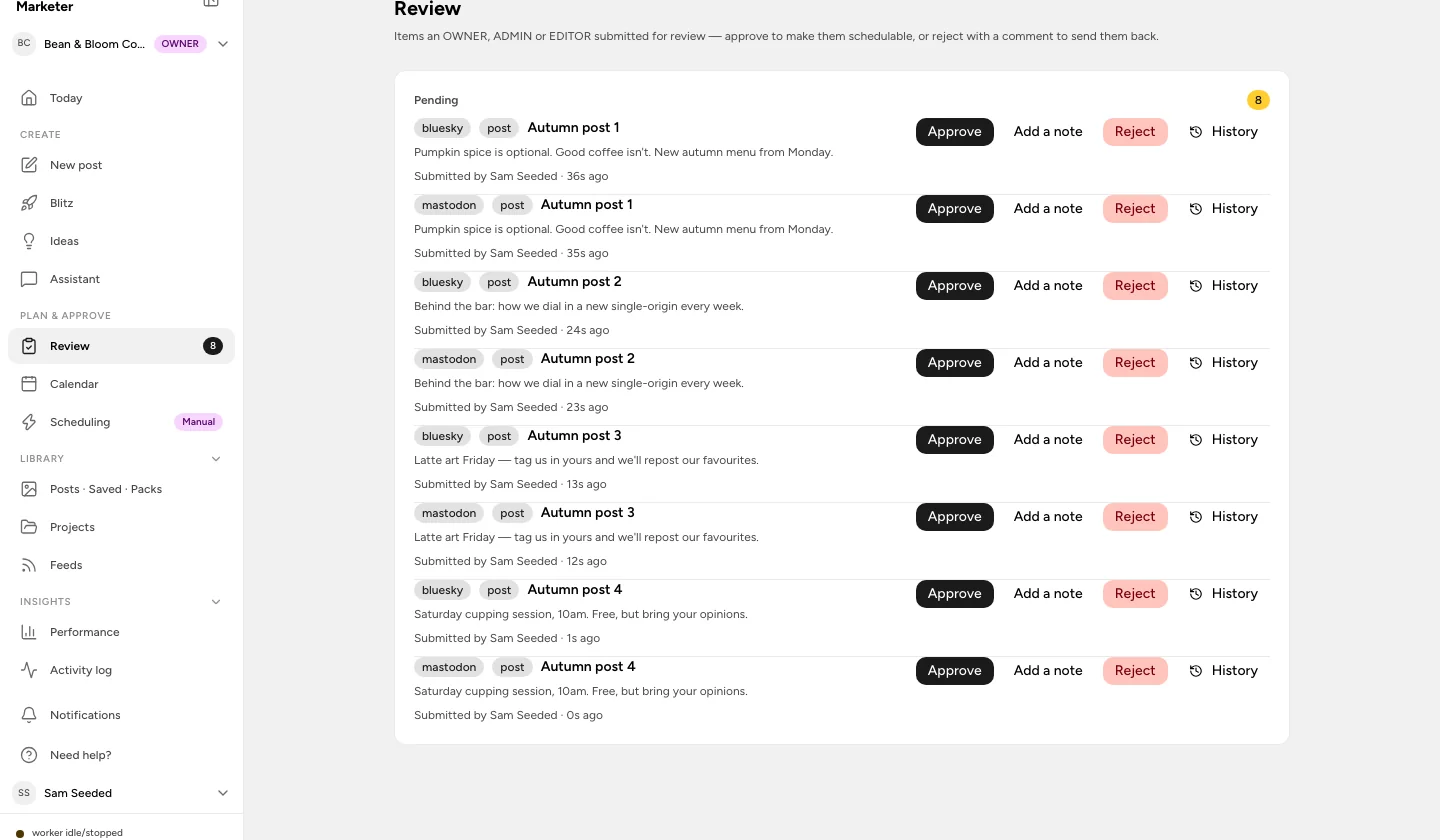
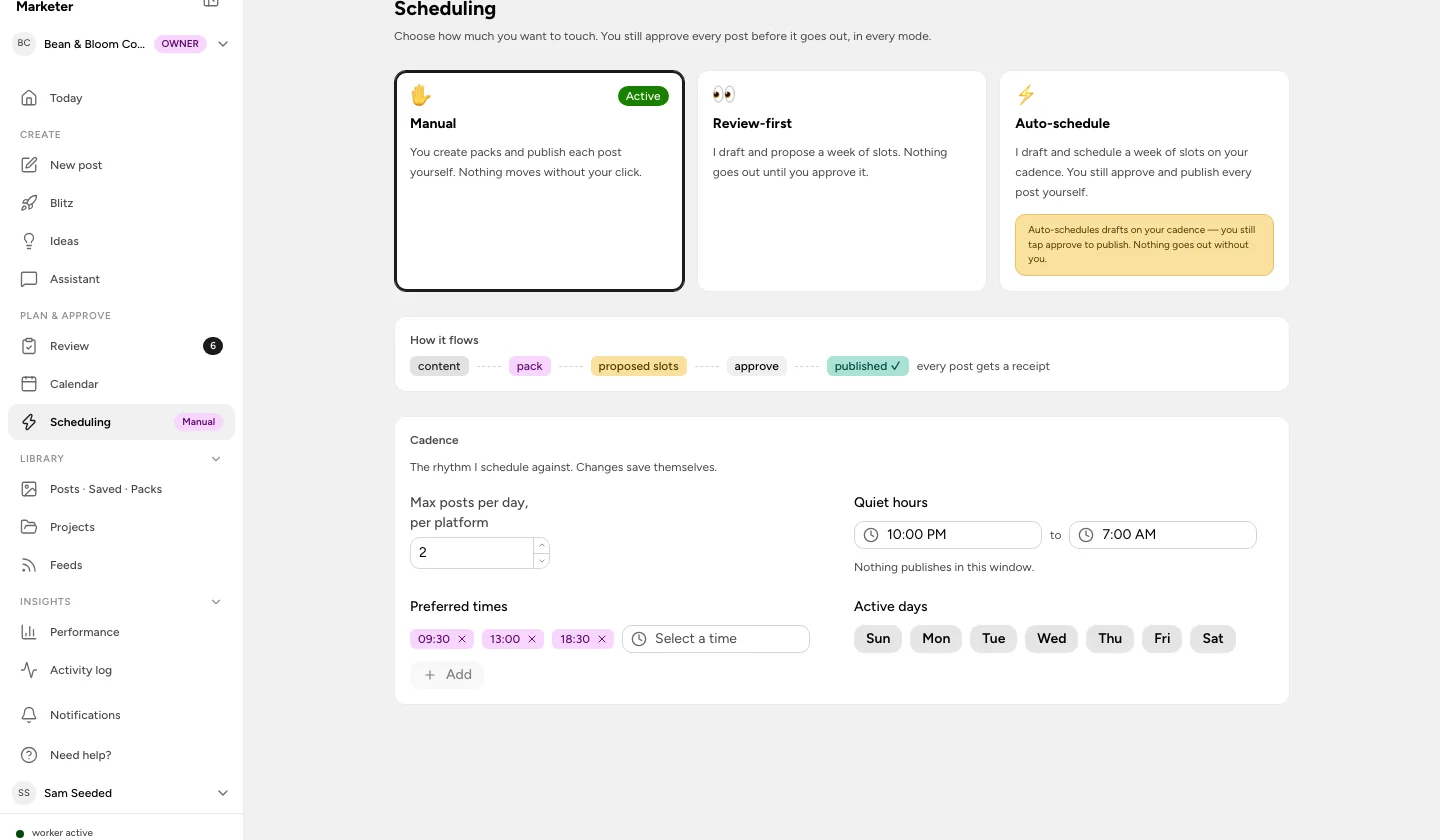
Screenshots of the product in a demo workspace with sample data, October 2026.
02 — What it does
Publishing essentials and the new creative tools.
Scheduling
AvailableA weekly calendar and a queue you approve. Choose manual, review-first or auto-schedule, then set preferred times, quiet hours, active days and a daily cap per platform. In every mode, nothing goes out until you approve it.
Publishing
AvailableReliable publishing after approval. A connection health check before each post, retries with backoff that respect each platform’s rate limits, a receipt for every published post, and a clear reason when a platform says no.
Approvals and team workflow
AvailableEvery post is published only after a person approves it, whether it was written in the app, queued over the API or drafted by an assistant. Approval is tied to the content you reviewed: edits require another review. Team invitations and review roles are included on Studio and Agency.
Performance and activity
AvailableReview reach, engagement and clicks where the network provides them, compare your top posts and find useful times to publish. The activity log records what happened to each post so a failure is something you can investigate.
API, MCP server and CLI
AvailableOn the Studio and Agency plans, what the app can do is also available over a REST API (in beta), an MCP server for Claude and ChatGPT, and a CLI. Drafts created this way still wait for a human yes.
Brand workspaces and media
AvailableKeep each client or brand in its own workspace, with its own channels, brand kit and voice settings. Store reusable media and organise assets as logos, products, people or screenshots. Uploads never use credits.
AI drafting and brand voice
Limited availabilityWhere AI generation is enabled, turn text, articles, feeds, videos or podcasts into drafts for each channel. Learn a voice from your own posts, score drafts against your quality criteria, and work with an assistant. Video transcription detects the source language so the drafts can follow it.
AI Studio campaigns
Limited availabilityStart with a brief, a product or your website. Review the extracted product facts and choose real screenshots before the studio prepares copy and creative. Campaigns move through research, review, creative checks and your approval; real-incident stories use sources you select.
AI agents and creative editing
Limited availabilityChoose an available agent, review its brief and credit estimate, and follow the run through its review steps. Edit image layouts and video timelines, preview changes, and adjust captions, framing, themes and watermarks before approving the result.
Model Studio and voiceovers
Limited availabilityWork directly with available image, video, voice, avatar and music models. Use reference assets, choose a voice and preview language, gender and tone options. Finished media requires an available generation provider; tools without one show a labelled preview or placeholder.
AI generation, AI Studio and AI agents have limited availability. Check your workspace for access. Image, video and voice generation also depend on the available models; a preview or placeholder is not a finished asset.
Inside AI Studio
Choose a starting point for the creative you need. These tools share the studio’s limited availability; generating a Reel or ad does not grant publishing or paid-ad access to a platform.
- AI Ad Generator
- Instagram Reel
- Text to Post
- Product Demo Video
- Shopify Product Video
- UGC Video Ad
- AI Influencer
- AI Meme Generator
- Hook Generator
- Assistant
Video and presenter tools need an available generation service; some previews remain simulated. AI Influencer character consistency is still in development. Read more about AI content creation. Developers: API, MCP server and CLI, API reference.
03 — Networks
Check what each channel supports.
The channel catalog now covers more services. Publishing depends on the connector, platform approval and permissions for your account. The Channels screen shows what you can connect.
Listed in Channels; connection and publishing are not available.
- Google My Business
- Skool
- VK
- Nostr
- Medium
- Whop
- Kick
- Lemmy
- Listmonk
- Hashnode
- Dribbble
- Twitch
- Warpcast
- MeWe
- WordPress
- Dev.to
04 — How it works
Four steps. The third one is always a person.
Connect your accounts
Open a workspace, connect the networks you publish to and invite the team with the right roles. A health check runs before every publish so a broken connection never surprises you on posting day.
Create and tailor
Write a post, use the API or CLI, or draft through MCP. Where AI is enabled, start from a source, product or website, then edit the copy and creative for each channel.
Approve
Drafts wait in the review queue. An owner or admin approves, or rejects with a comment that sends the post back. Nothing is schedulable without a yes.
Publish and measure
Approved posts go out on schedule with retries and a receipt, and a clear reason if a platform says no. Reach, engagement and clicks roll up per post and per account.
05 — Plans
Creator, Studio and Agency. No free tier.
Everything you need to publish every week.
- Live publishing after your approval
- 300 credits every month
- Content packs and clip rendering
- Up to 3 brands
For teams and multi-brand operators.
- Everything in Creator
- 1,000 credits every month
- Team members
- API access: REST, MCP server and CLI
- Up to 10 brands
For agencies running many client brands.
- Everything in Studio
- 5,000 credits every month
- Up to 25 brands
- Agency is a customer subscription tier for customers managing many client brands, not a description of Phronesis AI Lab’s business model.
- Every plan is published with a 7-day trial: a card is required, nothing is charged until the trial ends, and you can cancel before then.
- Trial availability and eligibility are shown at checkout. Every eligible trial includes 300 credits, including Studio and Agency trials; the full plan allowance starts after the first payment.
- Annual billing is two months free. Prices exclude applicable taxes (for example 18% GST in India).
- Posting is unlimited on every plan, with a fair-use limit of 25 posts per account per 24 hours.
- Credits pay for AI features such as image generation. Uploads never use credits. One-time packs: 250 for $15, 750 for $39, 2,000 for $95 or 5,000 for $225, valid for 365 days.
- Plan entitlement does not automatically grant access to AI tools in limited availability. Check the features available in your workspace before subscribing.
- When a trial or subscription ends the workspace becomes read-only; nothing is deleted.
Exact and current terms live on the product’s pricing page. Billing questions: billing@phronesisailab.com.
06 — How the business works
Self-serve subscription software, built and operated by the company that owns it.
Stated plainly. We do not publish revenue, customer counts or growth figures until they are real and audited. Company-level facts are on the company page.
- Who builds it
- Phronesis AI Lab Private Limited designs, builds and operates Social Digital Marketer as its own proprietary SaaS product. It is not built for, or on behalf of, any client.
- Who it is for
- Creators, small businesses and agencies that publish to several social accounts and want a person, not an automation, to have the final say. Agency is a customer subscription tier for customers managing many client brands, not a description of Phronesis AI Lab’s business model.
- How customers get it
- Create an account in the app when registration is open, verify your email and choose an available plan. Connect your channels and, on Studio or Agency, invite your team. Larger teams can book a demo first.
- How it is monetised
- Subscriptions. Three plans billed monthly or annually, sized by brand workspaces, team access and monthly credits, plus one-time credit packs. There is no free plan, no advertising and no resale of customer data.
- Billing and tax
- Payments are processed by Dodo Payments as merchant of record: USD worldwide, INR in India, taxes added at checkout. Billing questions reach billing@phronesisailab.com.
- Data and security
- Separate brand workspaces, encrypted connected-account tokens and an activity history. AI features use third-party models; we do not train models on customer content. See the product security page for current infrastructure and data-handling details.
- Stage
- Public beta. Scheduling, publishing and approvals form the core. AI drafting, AI Studio, Model Studio and AI agents have limited availability, and channel access depends on provider permissions.
07 — Availability and roadmap
Know what you can use before you choose a plan.
- AI generation, AI Studio and AI agents have limited availability. Check your workspace for access. Image, video and voice generation also depend on the available models; a preview or placeholder is not a finished asset.
- Channel access depends on platform permissions and account configuration. A channel in the catalog, or a creative format in AI Studio, does not mean publishing to that network is available.
- The managed X (Twitter) publishing add-on remains planned at $9/month. The existing connector requires X app credentials.
- The new catalog entries, including WordPress, Medium, Dev.to, Twitch and Google My Business, do not yet offer connection or publishing.
- Dedicated carousel generation, social listening, competitor intelligence, paid ads management and engagement automation remain planned. Creating ad creative does not buy or manage ad placements.
- Zapier, Make and n8n connectors and white-label report exports remain on the roadmap.
Security practices for the product (hosting, encryption, backups, data handling) are published on its security page; the lab’s own are on ours.
Try it
Take your next idea from draft to approved post.
Get started with Social Digital Marketer. Connect your channels, create and review your content, then schedule it with a person in control. Plans start at $19 a month; AI availability and trial eligibility are shown in the app.